
Inventory Tracking Systems
Track stock levels, item movement, warehouse locations, stock counts, transfers, dispatches and low-stock alerts with custom inventory tools.
View Inventory TrackerDigital Transformation Software: KioskPOS develops custom enterprise management systems that help businesses manage inventory, warehouses, visitors, teams, deliveries, operations, reporting, self-service kiosks and workflow automation from one connected platform.
Whether your business is trying to move away from spreadsheets, reduce manual admin, improve stock visibility, manage sign-ins, streamline dispatch, automate daily tasks or create a system that fits your exact workflow, KioskPOS can design and build a practical solution around the way your business already operates.
Custom dashboards, workflows, user permissions, reporting, hardware integrations and support for real-world business processes.
Digital Transformation Software can describe a specific business need, operational challenge, system requirement or software category. For many companies, the real problem is not just one isolated task. The bigger problem is that information is spread across spreadsheets, WhatsApp messages, paper forms, email threads, disconnected software tools and manual processes that become harder to manage as the business grows.
KioskPOS approaches Digital Transformation Software as part of a wider operational system. That means we look at how your team captures information, who needs access to it, what approvals are required, what reports management needs, what devices are being used, what integrations are important and how the system should support your day-to-day workflow. Instead of forcing your business into a fixed commercial platform, we help create software and hardware solutions that fit the actual way your operation works.
This can include inventory tracking, barcode scanning, asset management, warehouse control, stock movement, visitor sign-in, contractor management, staff check-in, delivery tracking, proof of delivery, production tracking, job cards, ordering systems, self-service kiosks, ticketing, queue management, digital reception, dashboards, reporting, notifications and API integrations.
The goal is simple: give your business clearer control, better visibility and less manual admin. When information is captured correctly at the source and displayed in useful dashboards, managers can make faster decisions, teams can work with fewer delays and customers or visitors can experience smoother service.
Commercial systems can be useful, but they often become restrictive when your business needs a specific field, approval step, workflow, user role, report, dashboard or integration. KioskPOS gives you the flexibility to build the exact system your operation needs.
We help connect software, hardware, dashboards and real operational processes into one practical management environment.
KioskPOS covers a wide range of business management systems, from simple tracking tools to advanced custom enterprise platforms.
Track stock levels, item movement, warehouse locations, stock counts, transfers, dispatches and low-stock alerts with custom inventory tools.
View Inventory TrackerManage bins, locations, receiving, picking, packing, dispatch, barcode scanning, proof of delivery and warehouse visibility.
View Warehouse SystemsDigitise visitor sign-ins, contractor access, staff check-ins, badges, reception workflows, compliance questions and site attendance records.
View Visitor SystemsCreate customer ordering kiosks, ticketing stations, queue systems, information screens, payment workflows and interactive service points.
View Kiosk SystemsSupport factories and operational teams with job cards, work orders, quality checks, SOPs, operator terminals and production dashboards.
View Industrial SystemsBuild dashboards, portals, admin systems, customer platforms, reporting tools, integrations and internal business applications.
View Custom Software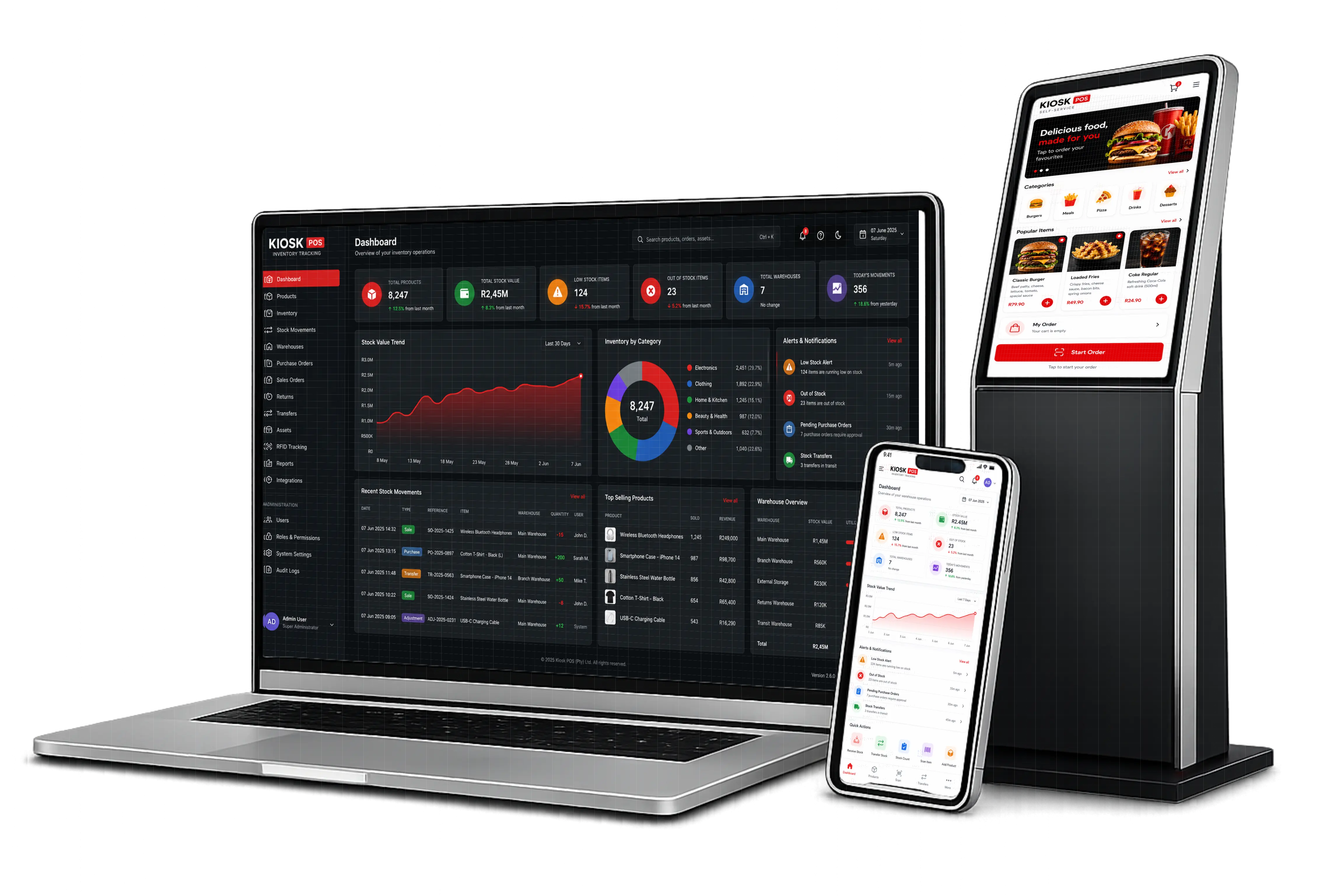
As businesses grow, small process problems become expensive. A missing stock item, delayed delivery, unsigned visitor register, incorrect order, manual report or untracked asset can create unnecessary admin and operational risk. Digital Transformation Software should therefore be more than a page, form or spreadsheet. It should be part of a connected system that helps the business capture accurate information and use it properly.
With KioskPOS, your system can be shaped around departments, branches, warehouses, users, permissions, hardware devices and reporting needs. The platform can be simple where your team needs speed and detailed where management needs visibility.
We build practical systems by first understanding the workflow, then designing software and hardware around the real operational requirement.
We identify what your team needs to capture, track, approve, scan, update, report or automate.
We plan the screens, modules, fields, user permissions, dashboards, reports and integrations.
We develop the platform, connect hardware or APIs and prepare the solution for live business use.
We help with rollout, training, updates, support, improvements and future workflow changes.
Off-the-shelf software is often a good starting point, but many businesses eventually reach a point where the standard platform no longer fits properly. The business may need a custom approval process, a special report, a branch-specific workflow, a different user role, a dashboard for management, a hardware integration, or a field that the commercial platform does not support.
The challenge is that commercial systems are designed for the average user. Your operation may not be average. Your team may have its own way of receiving goods, signing in visitors, dispatching deliveries, checking production quality, handling customer orders or managing assets. When the system does not match the workflow, staff create workarounds. Those workarounds usually become spreadsheets, duplicated data, manual reports, WhatsApp updates and admin delays.
KioskPOS helps businesses avoid that problem by building systems around real workflows. A custom system can include the fields you need, the steps your staff follow, the dashboards management wants and the integrations required to keep information moving. This makes Digital Transformation Software easier to manage and more useful as the business grows.
Stock control, bin locations, barcode scanning, picking, packing and dispatch workflows.
Production tracking, job cards, operator terminals, quality checks and factory dashboards.
Self-service ordering, POS workflows, stock visibility, queue systems and customer service tools.
Delivery tracking, proof of delivery, dispatch management and collection workflows.
Ticket scanning, event check-in, access control, queue management and digital information points.
Visitor sign-in, contractor access, staff check-in, reception systems and meeting room workflows.
Inventory movement, supplier records, order processing, branch transfers and delivery visibility.
Task tracking, job updates, mobile access, checklists, reporting and operational accountability.
Explore more KioskPOS systems, resources and external references related to business systems, inventory control and operational software.
Digital Transformation Software can refer to a business system, workflow, software requirement or operational solution. KioskPOS uses it as the starting point for building a connected management platform around your real business process.
Yes. KioskPOS can customise fields, modules, dashboards, user permissions, reports, workflows, notifications, integrations and hardware-connected processes.
Yes. KioskPOS solutions can include barcode scanners, QR codes, tablets, kiosks, printers, dashboards, mobile devices and other operational hardware where required.
No. KioskPOS can support growing businesses, multi-branch operations and larger enterprise workflows. The system can be scoped according to the size and complexity of your operation.
Yes. Depending on the requirement, KioskPOS can support API integrations, reporting exports, third-party connections and custom data workflows.
Yes. A properly designed system can reduce manual capturing, duplicated data, spreadsheet dependency, paper forms and unnecessary follow-up messages.
Tell us what you need to manage, track, automate or improve. KioskPOS can help you plan a custom system for your inventory, warehouse, visitor, kiosk, production, delivery or operational workflow.
Digital Transformation Software is not just about one feature. KioskPOS can support full business workflows across departments, teams, locations, devices and management levels.
Track products, stock levels, reorder points, movement history, warehouse locations, item counts, stock transfers, stock adjustments and daily operational usage. This helps reduce missing stock, manual counting errors and poor visibility across branches or storage areas.
Use barcode scanners, QR codes, mobile devices or kiosk screens to capture information faster and more accurately. Scanning can be used for stock take, receiving, dispatch, visitor check-in, asset tracking, ticket validation and proof of delivery.
Give managers access to live dashboards showing stock movement, visitor activity, job progress, dispatch status, team activity, branch performance, exceptions, approvals and daily operational trends.
Control what each user can see and do. Staff, managers, admins, contractors, visitors, warehouse teams, reception teams and branch users can all have different permissions depending on their role.
Automate alerts for low stock, missed tasks, unsigned visitors, pending approvals, delayed deliveries, incomplete job cards, failed checks, new requests and important workflow events.
Connect the system to websites, internal databases, reporting tools, payment systems, email platforms, SMS systems, WhatsApp workflows, accounting exports or other business software where required.
KioskPOS can build systems for businesses that need more control over daily operations. This can include a simple internal dashboard, a full inventory management platform, a self-service kiosk, a visitor sign-in system, a warehouse dispatch tool, a delivery tracking system, a production job card platform or a fully customised enterprise management system.
The system can be designed for desktop users, mobile teams, warehouse staff, front-desk reception users, customers, contractors, operators, managers or administrators. Each user type can have a different screen, different permissions and different actions. That is one of the biggest advantages of building a custom system instead of relying only on commercial software.
For example, a warehouse user may only need to scan stock in and out. A manager may need dashboards and reports. A customer may need a clean self-service screen. A contractor may need to sign in and answer compliance questions. A finance team may only need exports or reports. KioskPOS can connect these different requirements into one structured system.
This makes Digital Transformation Software more useful because it becomes part of the actual business workflow. The goal is not only to capture data. The goal is to make the data easier to use, easier to trust and easier to act on.
Some businesses only need a focused tool, such as an inventory tracker, visitor register, QR check-in screen or dispatch form. Other businesses need a larger management platform with multiple modules, user roles, dashboards, approvals, document uploads, notifications and integrations.
KioskPOS can work across both ends of that requirement. The system can start small and grow over time, or it can be planned as a larger platform from the beginning. This is useful for businesses that want to avoid buying software that becomes too limited after a few months.
Spreadsheets become difficult to manage when multiple people need to update the same information, especially across stock, orders, visitors, teams or deliveries.
Paper forms and manual admin create delays, duplicated work and mistakes. Digital forms and scanning workflows help capture data faster.
Without a live system, it becomes difficult to know what stock is available, where it is stored and when it moved.
Sales, warehouse, admin, operations and management often work from different information. A connected system gives everyone better visibility.
Manual reports take time and are often outdated by the time they are reviewed. Dashboards give faster insight into business activity.
When actions are not logged properly, it becomes difficult to see who changed what, when a task was completed or where a process failed.
Standard software may not support your exact fields, workflows, approvals, reports or integrations. Custom development solves this.
Approvals, stock checks, sign-ins, job updates and delivery confirmations can all slow down if the workflow is not digitised properly.
Depending on the project scope, KioskPOS can include a wide range of features to support Digital Transformation Software and the wider business operation.
Scan products, assets, tickets, documents, visitor badges or delivery items.
Use QR codes for sign-in, item lookup, tracking, customer actions and workflow shortcuts.
Allow staff to update records, complete forms or scan items from mobile devices.
Give managers a central place to view system activity and important business metrics.
Create forms that match your process, fields, questions, approvals and required documents.
Attach images, PDFs, proof documents, delivery notes, compliance files or job records.
Track who created, edited, approved, scanned, completed or deleted information.
Send alerts by email, SMS, WhatsApp or dashboard notification depending on the workflow.
Route requests, changes, orders or documents through approval steps before completion.
Manage different branches, warehouses, sites, teams or departments from one platform.
Export records to CSV, Excel, PDF or connected reporting tools when needed.
Connect with external systems, websites, dashboards, payment tools or other business software.
Commercial software can be a good choice when your business process is simple and matches the way the software was designed. The problem starts when your process becomes more specific. Maybe you need a different approval flow, a special report, a branch-level dashboard, a contractor sign-in question, a custom stock field, a hardware integration or a unique customer-facing screen. In many commercial platforms, those changes are either impossible, expensive or only available on enterprise plans.
With a custom KioskPOS system, the workflow can be designed around the actual operation. This means your team does not need to bend the business process to fit the software. The software can be shaped around your process, your users, your departments and your reporting needs.
This is especially important for companies that have grown beyond basic systems but do not want to be locked into a platform that cannot evolve. A custom system gives you room to add new modules, new reports, new integrations and new workflows as the business changes.
Works well when the business needs are simple, common and unlikely to change much.
Works well when the business needs unique fields, dashboards, approvals, integrations or processes.
Designed to support real operational workflows with software, hardware and ongoing support.
Track stock, orders, deliveries, returns, warehouse movement, customer collections and supplier records. A custom system can help distributors improve accuracy, reduce manual admin and give management better reporting.
Manage inventory, product categories, quote requests, stock locations, supplier data, sales workflows and internal processes. This is useful for businesses with large product ranges and complex ordering requirements.
Digitise job cards, operator checklists, machine station updates, production progress, quality control steps and supervisor dashboards.
Manage visitors, contractors, deliveries, staff access, sign-in rules, emergency records and reception reporting across one or multiple sites.
Support ticket scanning, access control, queue management, kiosk information points, vendor check-in, staff access and event-day reporting.
Track jobs, tasks, checklists, technician updates, customer records, service reports, parts usage and completion evidence.
Many projects need more than software alone. KioskPOS can help plan the screens, kiosks, scanners, printers, tablets, dashboards and connected devices that make the system practical for real-world use.
This is useful when users are not sitting at a desk, such as warehouse workers, visitors, production operators, event staff, delivery teams or customers using a self-service kiosk.